
Sooner or later the question arrives, usually from an auditor or from a security team that has just discovered your IBM i exists: which known vulnerabilities affect this system, and are we covered?
Answering it by hand is not hard, it is just tedious. You open the IBM Support security bulletins page, you filter for IBM i, you open one bulletin at a time, you read the “Affected Products and Versions” table, then the “Remediation/Fixes” table, you write down the PTF numbers, and finally you go back to the system and check whether those PTFs are applied. Multiply that by a few dozen CVEs and by a few dozen partitions and you have lost your afternoon.
So I did what I usually do in these cases: I moved the whole thing into SQL. The result is four functions that build on each other, and the last one answers the auditor’s question with a single SELECT.
Let me walk you through them one at a time.
1. Getting the CVE list: SQLTOOLS.CVE_LIST
IBM Support exposes its security bulletin search as a JSON endpoint:
https://www.ibm.com/support/pages/securityapp/api/search?q=IBM%20iThat is all we need. We download it with QSYS2.HTTP_GET and we shred the JSON with JSON_TABLE, mapping each field of the response to a column of the returned table.
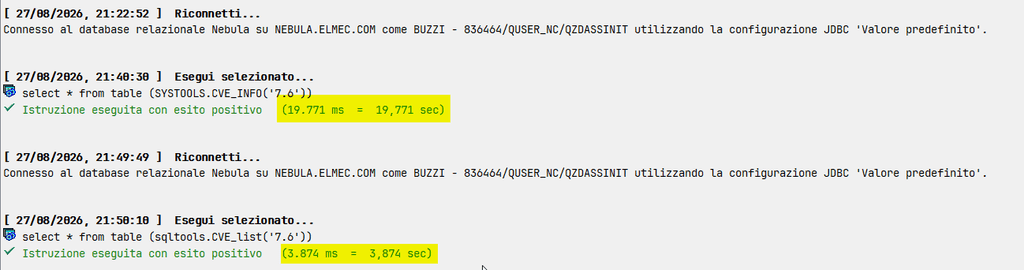
A note on the choice of function, because it matters. I am using QSYS2.HTTP_GET, not the old SYSTOOLS.HTTPGETCLOB. I already wrote about this in Stop using SYSTOOLS.HTTP, long life QSYS2.HTTP: the SYSTOOLS versions go through Java, they are much slower, and their certificates live in the Java keystore, which gets replaced every time you apply the Java Group PTF. The QSYS2 versions use DCM and they are dramatically faster. In a function that is going to fire a lot of HTTP requests, that difference is not academic.
Here a comparison between SYSTOOLS version and mine:
The signature is simple:
CREATE OR REPLACE FUNCTION SQLTOOLS.CVE_LIST (
    IBMI_RELEASE CHAR(3) CCSID 1208 DEFAULT (
        SELECT SYSIBMADM.ENV_SYS_INFO.OS_VERSION CONCAT '.' CONCAT
               SYSIBMADM.ENV_SYS_INFO.OS_RELEASE
          FROM SYSIBMADM.ENV_SYS_INFO)
)
The default value is the part I like most. If you call the function without arguments, it reads SYSIBMADM.ENV_SYS_INFO and filters on the release of the system you are currently connected to. If you want to check a different release before an upgrade, you just pass it: SQLTOOLS.CVE_LIST('7.6').
The filtering itself happens at the end of the body, on the field_affected_products value returned by IBM:
WHERE CVE_AFFECTED_PRODUCTS LIKE '%' CONCAT IBMI_RELEASE CONCAT '%'One more thing about the HTTP call. I pass '{"sslTolerate":"true"}' as options, which skips the certificate check. It is convenient while you are testing, but the right thing to do on a production partition is to import the CA into DCM and drop that option.
2. Finding the corrective PTFs: SQLTOOLS.GET_CVE_PTFS
The JSON endpoint tells us that a CVE exists and gives us the URL of its bulletin, but it does not tell us which PTFs fix it. That information only lives in the HTML page.
Now, parsing HTML with SQL is not something I would normally recommend, and I want to be honest about it. The page is static and its structure is stable enough to work with, so I went ahead, but this is the fragile part of the whole chain. If IBM redesigns those pages, this function stops working.
The logic goes like this:
Download the page. QSYS2.HTTP_GET again, cast to a CLOB(2M) in CCSID 1208.
Locate the two sections we care about. A small VALUES table defines them by their headings:
- section 1 goes from Affected Products and Versions to Remediation/Fixes
- section 2 goes from Remediation/Fixes to Workarounds and Mitigations
REGEXP_INSTR gives us the start position (with return option 1, so we land just after the heading) and the end position, searching forward from the start. SUBSTR then cuts the page between the two.
Extract the tables. Section 1 has one table, section 2 has one table per affected component. To get “the Nth occurrence of a <table>” I use a small numbers table built with ROWNUMBER() over QSYS2.SYSTABLES, limited to 50 rows, and cross join it with the sections. The same trick comes back twice more, for the <tr> rows and for the PTF numbers inside a row. It is a classic, and on IBM i it costs nothing.
Read the licensed program from the header. Each remediation table has the product written in the header of the PTF column, in the form 5770-SS1 PTF Number(s). A REGEXP_SUBSTR picks up the nnnn-XXX pattern and a REGEXP_REPLACE removes the dash, so the value matches what QSYS2.SOFTWARE_PRODUCT_INFO returns. That small normalisation is what makes the join in the next function possible.
Clean the cells. For each row I take the first two <td> or <th> cells, strip the tags, replace and   with a real blank, collapse repeated whitespace and trim. Nothing clever, just three nested REGEXP_REPLACE.
Tell rows apart. In the affected products table the version is in the second cell, in the remediation table the release is in the first one. Testing that cell against ^[0-9]+\.[0-9]+$ does two jobs at once: it identifies the release and it silently discards the header row.
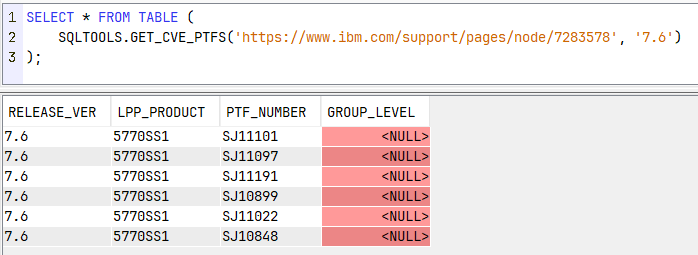
Pull the PTF numbers. Each remediation row can list several fixes, so I read up to twenty occurrences of ([A-Z]{2}[0-9]{5}|SF99[0-9]{3}). When the match starts with SF99 we are looking at a group PTF, and in that case the required level is written next to it as Level nnn, which a second REGEXP_SUBSTR extracts into GROUP_LEVEL.
Deduplicate. Every PTF appears twice in the page, once as text in the cell and once inside its download link, so the final SELECT is a SELECT DISTINCT.
Two parameters, the URL of the bulletin and an optional release filter:
SELECT * FROM TABLE (
    SQLTOOLS.GET_CVE_PTFS('https://www.ibm.com/support/pages/node/7283578', '7.6')
);
3. Putting the two together: SQLTOOLS.CVE_LIST_DETAILED
At this point we have a function that lists the CVEs and a function that reads the PTFs out of a bulletin. Joining them is the obvious next step, and SQL makes it painless because CVE_LIST already returns the bulletin URL:
FROM TABLE (SQLTOOLS.CVE_LIST(IBMI_RELEASE)) C
LEFT JOIN TABLE (
    SQLTOOLS.GET_CVE_PTFS(C.IBM_SUPPORT_URL, C.IBMI_RELEASE)
) P ON 1 = 1
The LEFT JOIN is deliberate. If a bulletin has no parsable remediation table, or if the page layout has changed, the CVE still shows up in the result with a null PTF instead of disappearing from the report. In a security context, losing a row silently is much worse than showing an incomplete one.
The result is one row per CVE and per corrective PTF, with score, title, publication date, licensed program, affected products, bulletin URL and X-Force link.
4. The actual answer: SQLTOOLS.CVE_STATUS
This is the function that answers the auditor. It takes what we have collected from IBM and compares it against the system you are running on.
Three ingredients:
- the current release, read from the
QSS1MRIdata area inQUSRSYSthroughQSYS2.DATA_AREA_INFO, and reformatted asV.R - the applied PTFs, from
QSYS2.PTF_INFO, keeping the ones in statusAPPLIED,PERMANENTLY APPLIEDorSUPERSEDED - the installed licensed programs, from
QSYS2.SOFTWARE_PRODUCT_INFO
Both lists go into global temporary tables, then CVE_LIST_DETAILED is joined against them and two statuses are derived:
AFFECTED_STATUS answers “does this CVE concern me at all”. If the licensed program named in the bulletin is installed on the system, the answer is AFFECTED. If it is not installed, it is NOT AFFECTED, and you can stop worrying about it. Note that when the parser could not determine the LPP, the row is treated as AFFECTED. Again, better a false positive than a missed vulnerability.
COVERED_STATUS answers “have I already fixed it”. If the corrective PTF is in the applied list, the row comes back as COVERED, together with the date it was applied, which is handy when someone asks when you patched. Otherwise it is NOT COVERED.
Three optional parameters let you slice the result:
COMMENT ON PARAMETER SPECIFIC ROUTINE SQLTOOLS.CVESTATUS (
    IS_AFFECTED IS 'AFFECTED, NOT AFFECTED or *ALL (default)',
    IS_COVERED  IS 'COVERED, NOT COVERED or *ALL (default)',
    SCORE_CRIT  IS 'Critical, High, Medium, Low or *ALL (default)'
);
Using it
The full picture for the system you are connected to:
SELECT * FROM TABLE (SQLTOOLS.CVE_STATUS());And the query that really matters, the one I would run before a patching window:
SELECT * FROM TABLE (
    SQLTOOLS.CVE_STATUS(IS_AFFECTED => 'AFFECTED',
                        IS_COVERED  => 'NOT COVERED',
                        SCORE_CRIT  => 'Medium')
);
Swap Medium for Critical or High and you have your priority list, with the PTF numbers already in the result. From there it is a short step to feeding those numbers into an SNDPTFORD, or to scheduling the query and mailing the output every Monday morning.
A few caveats
Before you copy this into production, keep two things in mind.
The first one I have already mentioned: GET_CVE_PTFS reads an HTML page written for humans. It works today, it may break the day IBM changes that template. Treat the function as something to keep an eye on, not as a documented API.
The second is the meaning of COVERED. The check is done on the single PTF number, so a fix delivered only inside a group PTF that you have not applied at the required level will show up as not covered even if the individual PTF is superseded elsewhere. The GROUP_LEVEL column is there exactly to let you make that call yourself.
All the functions use SET OPTION USRPRF = *USER and DYNUSRPRF = *USER, so whoever calls them needs the authority to read PTF_INFO and SOFTWARE_PRODUCT_INFO, plus outbound HTTPS access from the partition.
You can get the source code clicking on this link.
And you, how do you keep track of CVEs on your partitions? Manual reading of the bulletins, an external scanner, or something homemade like this?
Andrea
Trackbacks/Pingbacks