
If someone were to ask me what I really love about IBM Bob, it’s not so much the code generation as the inclusion of the Premium Package for IBM i. Some people describe it as a simple connector that lets you connect directly to the system, analyze the source code, and recompile on your own. But that’s just a tiny part of it. What I love most are the workflows, the analysis and extraction of business logic (which we’ll cover in another article), the modernization of the code, and above all, the analysis of the database’s health and performance.
So, I asked Bob to look at the SQL workload of one of our internal systems and tell me which indexes were missing. In about twenty minutes it captured a plan cache snapshot, crossed it with the Index Advisor and the MTI catalog, and handed me seven index proposals ranked by priority, each one with the CREATE INDEX ready to run.
If you work on IBM i you know the usual routine: open ACS, dig into the plan cache, sort SYSIXADV by TIMES_ADVISED, check which MTIs the optimizer keeps rebuilding, then compare everything against the indexes you already have. None of it is hard, it is just long, and it is the kind of work that gets postponed until a user complains.
In this article we will see how the SQL Index Strategy Advisor workflow of the IBM Bob Premium Package for i automates that routine, what the output looks like on a real system, and, most importantly, where you still need to put your own eyes before pressing Enter.
The IBM i Database mode and its performance skills
The Premium Package for i adds two IBM i modes to Bob: IBM i Developer and IBM i Database. All the SQL performance work lives in the second one. According to the official docs, the Database mode is meant for writing and reviewing Db2 for i SQL, understanding complex schemas and analyzing query performance and index strategies.
What makes it useful is the context it injects at the start of every task. It reads the active connection from Code for IBM i and the active SQL job from the Db2 for IBM i extension: OS version, CCSID, SQL naming, current schema, library list and isolation level. In other words, Bob knows which system and which job it is talking to before you type anything.
On top of the mode, a chain of performance skills is loaded when needed:
| Skill | What it brings |
|---|---|
db2-performance-primer | Entry point: SQE vs CQE and a four-step flow, Collect → Analyze → Optimize → Index |
db2-sql-find-performance-data | Finds existing plan cache snapshots and database monitors on the system |
db2-sql-performance-analysis | Plan cache analysis, Visual Explain interpretation, Index Advisor |
db2-sql-optimization | Query rewriting, join order, predicate pushdown |
db2-index-strategy | Radix vs EVI, index syntax, selection and maintenance |
You can use these skills in a free conversation, but the interesting part is the workflow that strings them together.
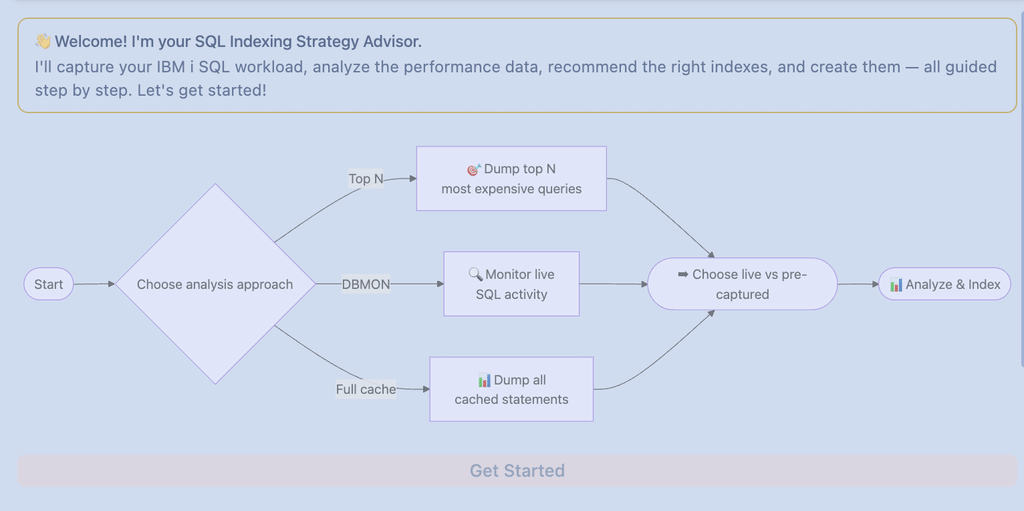
Starting the SQL Index Strategy Advisor
The workflow is available only in a library list workspace, so first connect to your IBM i with Code for IBM i and pick that workspace. Then press Start Workflow at the top of the chat and launch SQL Index Strategy Advisor. Bob can also propose it by itself if you ask something like “why is this query slow?” in the Database mode.
The first thing you notice is that Bob switches to the ibm-i-database mode on its own. Then it asks a few questions, and this is where IBM made a smart design choice: these steps are deterministic, not agentic. Bob does not improvise how to collect data, it follows a fixed path, which saves tokens and gives repeatable results.
- Data source: analyze existing data (a plan cache snapshot or a database monitor you already have) or capture new data.
- Capture method: in my case a plan cache snapshot via
DUMP_PLAN_CACHE. Starting an SQL performance monitor is the other option when you need to observe a specific time window. - Settings and filters: target library and file name for the snapshot, plus filters on what to keep.
- Capture: Bob runs the dump and confirms it. In my run the snapshot landed in
MYLIB/PCACHE.
A tip: the plan cache is cleared at every IPL and ages out over time. Run the capture after a normal business day, not on Monday morning, otherwise you will analyze an empty cache.
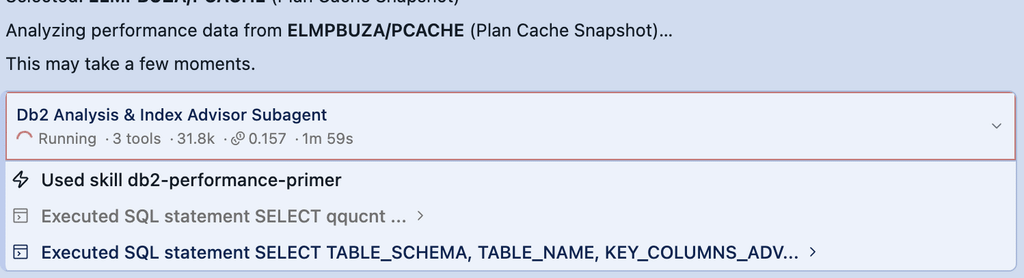
Once the data is there, the analysis is handed to a subagent dedicated to Db2 analysis and indexes. This is the agentic part: it queries the snapshot, QSYS2.SYSIXADV, the MTI information and the catalog of existing indexes, and correlates them.
What the report tells you
The output is a structured report in six parts, and honestly it is the kind of document I would expect from a junior DBA after a day of work.
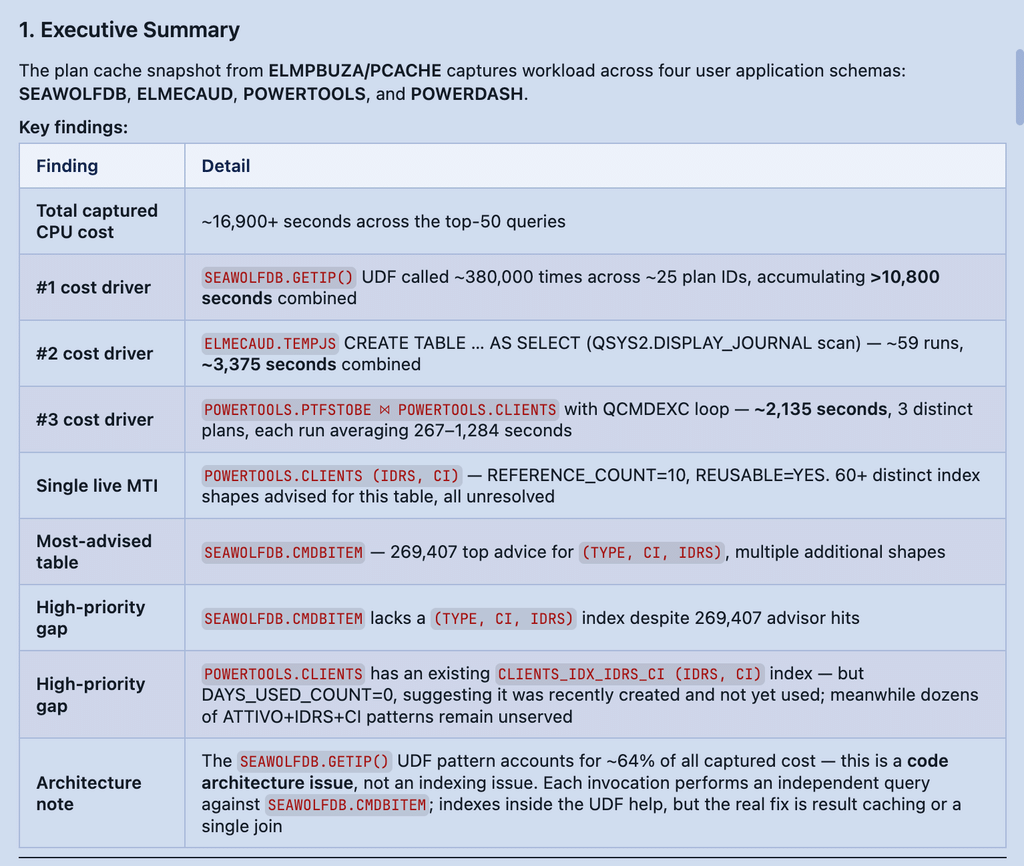
Executive summary. Bob found four application schemas, extracted the top 50 queries outside the system Q* libraries (about 14,500 seconds of cumulated time), two active MTIs, 49 existing permanent indexes and, after deduplication, seven new index proposals.
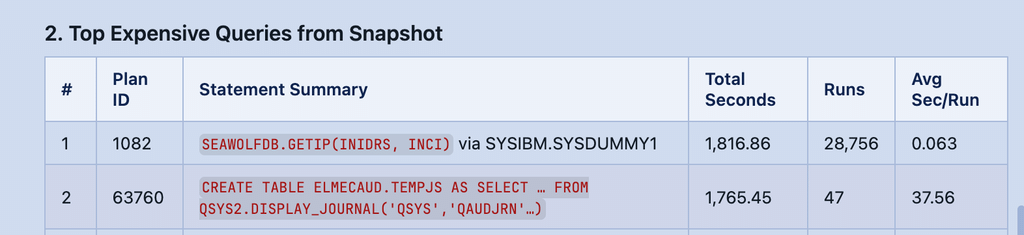
Top expensive queries. A ranked table by total time, with executions and average time. Two patterns jumped out immediately on my system:
- a scalar UDF,
GETIP(), called tens of thousands of times with an average of about 0.06 seconds per call: cheap alone, more than 1,800 seconds in total for the top statement only; - a few
CREATE TABLE ... ASstatements reading the audit journal throughQSYS2.DISPLAY_JOURNAL, with an average of 35 seconds each.
Bob correctly notes that the journal extractions will not be fixed by an index: their time is dominated by reading QAUDJRN.
MTI analysis. This is my favorite part. Bob lists the active MTIs with key, size, REFERENCE_COUNT and REUSABLE. An MTI with a reference count of 16 and marked reusable is the optimizer telling you, loudly, that it wants that access path and is rebuilding it every time. The recommendation is simple: promote it to a permanent index.
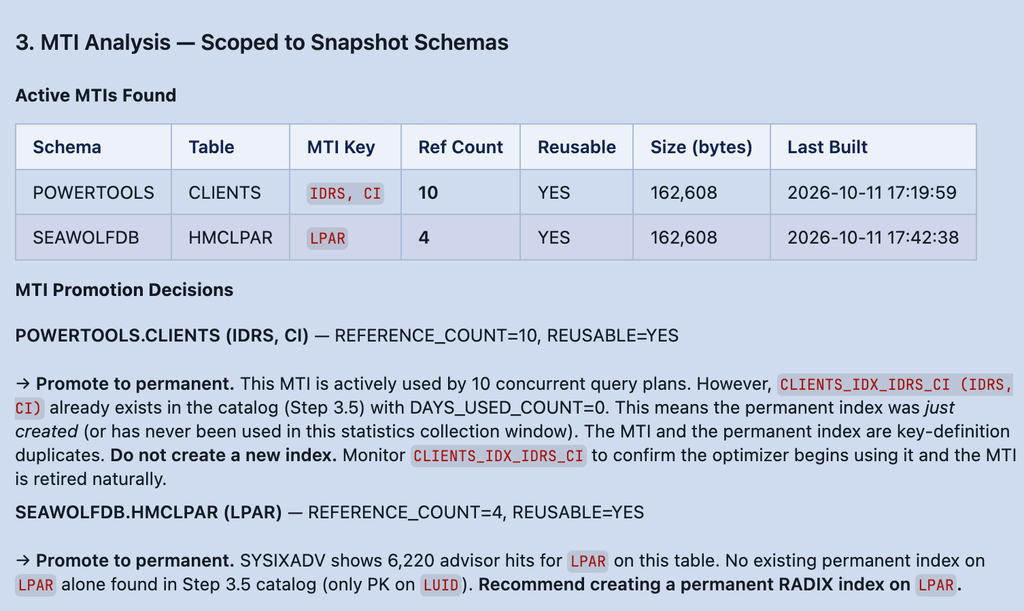
Index recommendations. For each proposal you get the benefit, the advisor numbers behind it and a ready CREATE INDEX with a proper 10-character system name:
CREATE INDEX POWERTOOLS.CLIENTS_IDX_IDRS_CI FOR SYSTEM NAME CLIIDXIC
  ON POWERTOOLS.CLIENTS (IDRS, CI);
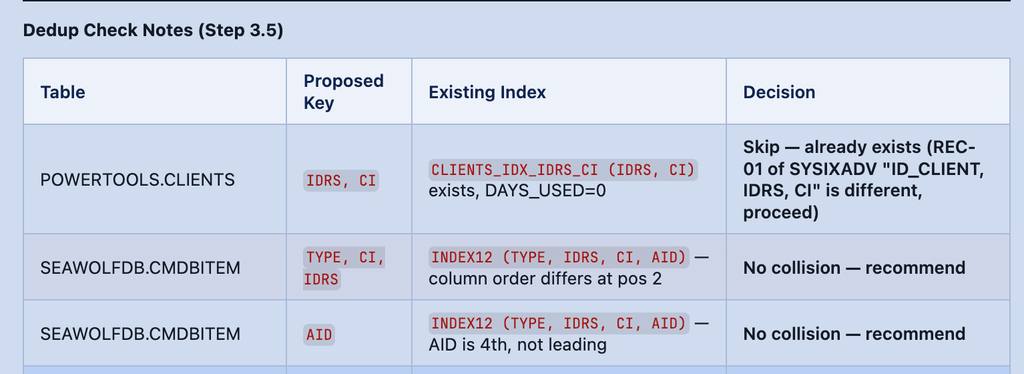
Before proposing anything, the workflow runs a collision check against the existing indexes and shows it as a table: proposed key, existing index with a similar key, verdict.
Consolidation candidates. A conservative bonus section. On one table Bob found two indexes on the same column, one of them with DAYS_USED_COUNT = 0, and suggested evaluating it with the application team instead of dropping it. On a table with more than 60 advised key combinations it explicitly recommends not creating them all, but implementing the top two and measuring again.
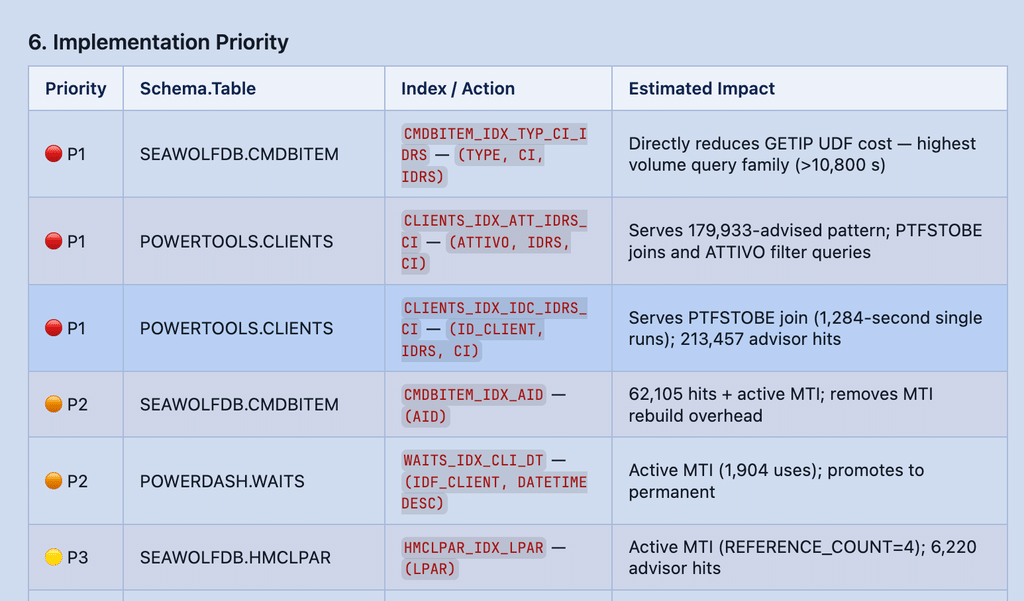
Implementation priority. A final table that orders the seven indexes and suggests applying the top three in one maintenance window, capturing a new snapshot after 24–48 hours and checking with Visual Explain that the optimizer actually picks them.
Read it with a DBA’s eye
The report is good, but it is not gospel. Going through it line by line I found a few points where I would not follow Bob blindly, and they are worth sharing because they are typical.
Column order and equality predicates. For one table Bob proposes a new index on (TYPE, CI, IDRS) because the existing INDEX12 is on (TYPE, IDRS, CI, AID) and “the order is different”. If the queries use equal predicates on all three columns, the order of those columns does not matter for the probe: INDEX12 already covers TYPE = ? AND CI = ? AND IDRS = ? as a leading prefix. The advice may still be legitimate if a query has a range on one column or needs that ordering for a GROUP BY or ORDER BY, but you have to check it with Visual Explain before adding a second, almost identical index to maintain on every insert.
“Times advised” is not “number of advices”. The summary says more than 100 advices, the details talk about 231,072 or 269,407. Both are true: the first is the number of rows in SYSIXADV, the second is TIMES_ADVISED, i.e. how many times the optimizer would have liked that index. Keep this in mind when you present the numbers to someone else.
Unused does not mean useless. The index with DAYS_USED_COUNT = 0 has a _UQ suffix. If it backs a unique constraint, it is working every time a row is written, even if the optimizer never uses it for reads. Bob flagged it to discuss with the application team, which is exactly the right call.
Some problems are not about indexes. A scalar UDF called 28,000 times will benefit from a better index on the tables it reads, but the real gain is often in rewriting the call as a join or making the function inline-able. The workflow is focused on index strategy, so for that you need a follow-up with db2-sql-optimization or /review_SQL.
None of these are blocking issues. They simply remind us that the workflow does in twenty minutes the collection and correlation work, while the final decision is still ours.
Choosing what to create
At the end of the report Bob does not create anything on its own. It shows the list of proposed indexes and asks you to select which ones to build. Only the selected ones are created, directly on the IBM i, and the workflow closes with a summary of data source, findings, indexes created and next steps.
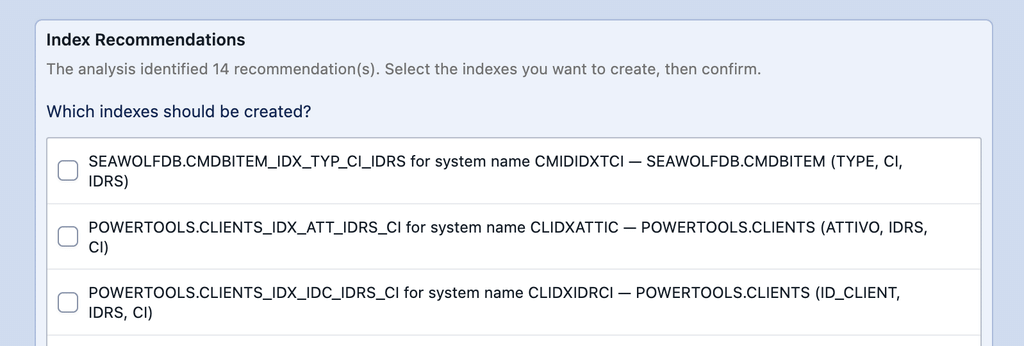
I selected only one: the index that promotes the MTI on POWERTOOLS.CLIENTS (IDRS, CI), the one with the strongest evidence behind it. The reason is simple: one change at a time, then measure. With seven new indexes in one go, if something improves (or gets worse) you will never know which one did it.
My plan for the next days is the one Bob itself suggests:
- let the system run 24/48 hours with the new index;
- capture a new plan cache snapshot with the same workflow;
- check in Visual Explain that the optimizer uses the new index and that the MTI is gone;
- then move on to the next candidates, after verifying the column-order case discussed above.
Conclusion
The SQL Index Strategy Advisor does not replace the DBA, but it removes the most boring part of the job: collecting data, crossing advisor, MTIs and existing indexes, and writing the DDL. What I liked most is the design: deterministic steps for the capture, an agent only for the analysis, and a human approval before anything touches the database.
If you already use Code for IBM i and the Db2 for IBM i extension, the setup is minimal. Run it on a test partition first, read the report carefully, and use it as a starting point for your index strategy rather than as the final answer.
As always, if you try it on your systems, let me know what you find.
Andrea