
Recently, a client came to me after a penetration test with a short report and a long list of red lines. Most of them pointed to the same thing: ports 8470 to 8476 open on the IBM i, accepting connections in clear text. His question was simple: how do I protect the host servers without breaking ACS, ODBC and all the applications that talk to this machine?
It is a fair question, and until recently the answer was not elegant at all. Let me show you the old way, the new way, and how to get there without surprises.
The old way: port restrictions
Before IBM i 7.6, the host servers had no parameter to say “start only the secure listener”. The workaround documented by IBM was a TCP/IP port restriction: you go into CFGTCP option 4 and restrict ports 8470 to 8476 to a user profile other than QUSER. Since the host server daemons start under QUSER, they can no longer bind the insecure ports, and at the next start only the TLS ports 9470 to 9476 are listening.
It works, but it is a trick. It is all or nothing, it is not obvious to whoever looks at the system after you, and it gives you no way to keep a non secure port available only for local applications.
The new way: CFGHOSTSVR
With IBM i 7.6 we finally got a dedicated command: Configure Host Server (CFGHOSTSVR). It lets you decide, server by server, what kind of connections are allowed.
For the servers that support TLS (Central, Database, Data Queue, File, Network Print, Remote Command and Signon) you set the connection type with the CNNTYPE parameter:
*SECURE: only TLS connections. The insecure listener is not started at all.*SECLOOP: TLS connections from outside, plus insecure connections over loopback only. The non secure port is not listening on the external interfaces.*ALL: both listeners started, the classic behaviour.
Then there are the servers that only speak in clear text: virtual print, transfer and network drive. For them there is no TLS option, so the command simply lets you turn them on or off with the LISTEN parameter, *YES or *NO.
*SECLOOP is the value I like most, because it solves a real problem. Many shops have Java or PHP applications running on the same partition that connect to the database through the host servers on localhost. Forcing them to TLS means managing certificates for a connection that never leaves the box. With *SECLOOP the outside world sees only port 947x, while local jobs keep working as before.
Before you close anything: who is using the insecure ports?
This is the step that saves you the angry phone call on Monday morning. Before changing a single parameter, find out who is still connecting in clear text. Of course, we do it with SQL:
SELECT N.REMOTE_ADDRESS,
       N.LOCAL_PORT,
       N.LOCAL_PORT_NAME,
       COUNT(*) AS CONNECTIONS
  FROM QSYS2.NETSTAT_INFO N
 WHERE N.LOCAL_PORT BETWEEN 8470 AND 8476
   AND N.TCP_STATE = 'ESTABLISHED'
 GROUP BY N.REMOTE_ADDRESS, N.LOCAL_PORT, N.LOCAL_PORT_NAME
 ORDER BY CONNECTIONS DESC;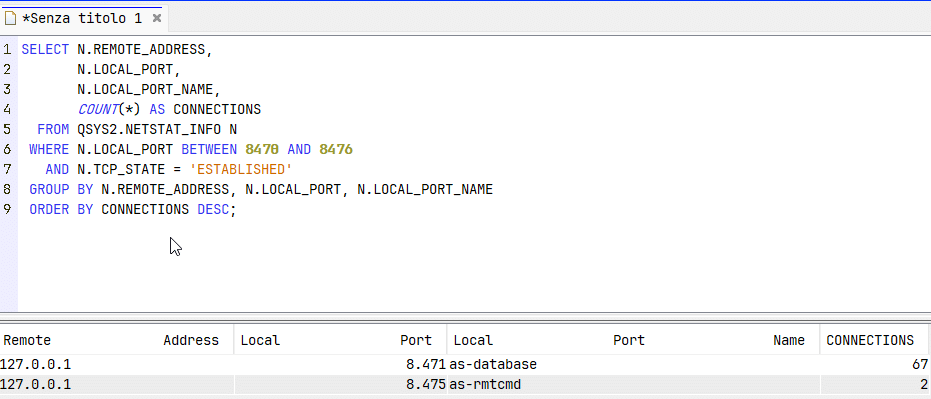
If you also want to know which user profile is behind each connection, QSYS2.NETSTAT_JOB_INFO gives you the job and the authorization name:
SELECT J.REMOTE_ADDRESS,
       J.LOCAL_PORT,
       J.JOB_NAME,
       J.AUTHORIZATION_NAME
  FROM QSYS2.NETSTAT_JOB_INFO J
 WHERE J.LOCAL_PORT BETWEEN 8470 AND 8476
 ORDER BY J.REMOTE_ADDRESS;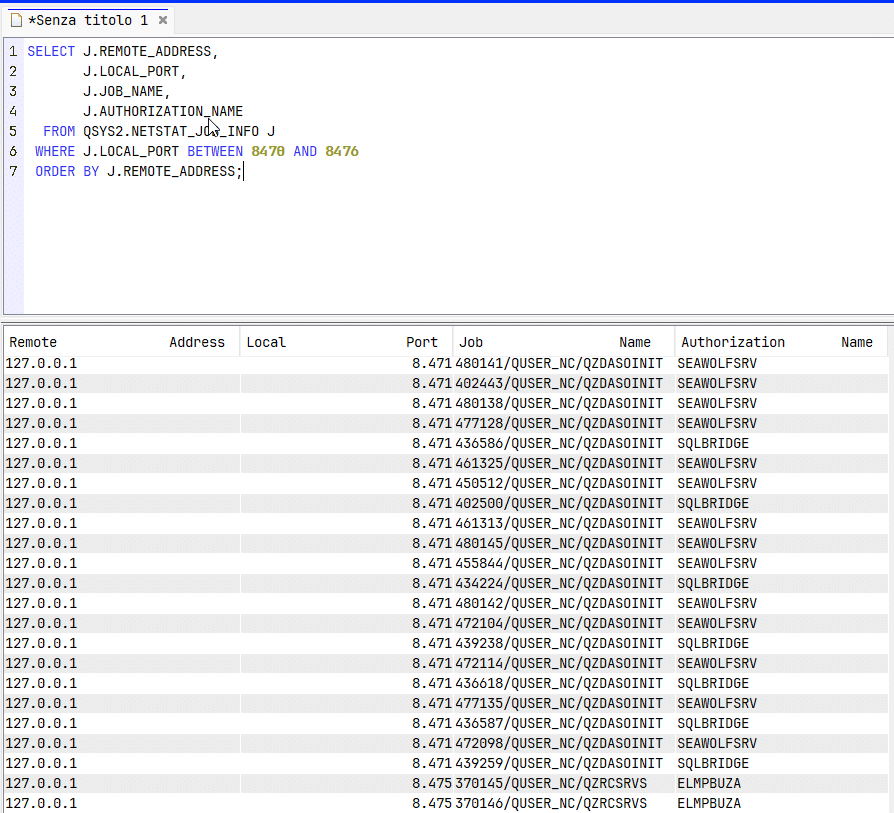
A single snapshot is not enough, so my advice is to schedule this query for a couple of weeks and save the output into a table. Batch jobs that run once a month, the forgotten ETL server, the old Excel macro on the CFO’s laptop: they all show up eventually. If you see 127.0.0.1 or ::1 in the remote address, that traffic is a perfect candidate for *SECLOOP.
Making sure TLS actually works
Closing the insecure ports only makes sense if the secure ones are ready. That means:
- a certificate assigned in DCM to the host server application IDs
- the CA of that certificate trusted by the clients
- ACS, ODBC and JDBC connections configured to use TLS (in ACS, the “Use SSL for connection” flag on the system definition, for JTOpen the
secure=trueproperty)
Test from one client first and check with the queries above that the connection really lands on port 947x.
Applying the change
Once you know who connects and how, you can move server by server. For example, database and remote command in loopback only, everything else secure, and the clear text only servers switched off:
CFGHOSTSVR SERVER(*DATABASE) CNNTYPE(*SECLOOP)
CFGHOSTSVR SERVER(*RMTCMD)   CNNTYPE(*SECLOOP)
CFGHOSTSVR SERVER(*SIGNON)   CNNTYPE(*SECURE)
CFGHOSTSVR SERVER(*CENTRAL)  CNNTYPE(*SECURE)
CFGHOSTSVR SERVER(*FILE)     CNNTYPE(*SECURE)
CFGHOSTSVR SERVER(*DTAQ)     CNNTYPE(*SECURE)
CFGHOSTSVR SERVER(*NETPRT)   CNNTYPE(*SECURE)
CFGHOSTSVR SERVER(*NETDRIVE) LISTEN(*NO)
Then restart the host servers so the daemons pick up the new configuration:
ENDHOSTSVR SERVER(*ALL)
STRHOSTSVR SERVER(*ALL)
Then restart the host servers so the daemons pick up the new configuration:
ENDHOSTSVR SERVER(*ALL)
STRHOSTSVR SERVER(*ALL)
Run this in a maintenance window: ending the host servers drops every ACS (not 5250) and ODBC session, including yours.
To test it, try using disable SSL on you ACS and test, it wouldn’t work!
A few caveats
The first one: CFGHOSTSVR is a 7.6 command. On 7.5 and earlier the port restriction is still your only option, so if you are planning the upgrade, this is one more good reason.
The second: these host servers are not the only door. Telnet has its own setting (CHGTELNA with SSL *ONLY), and FTP, DDM/DRDA and the HTTP servers each have their own configuration. Closing 8470 to 8476 is a big step, not the end of the job.
The third: if you used the port restriction trick in the past, remember to remove it once you switch to CFGHOSTSVR. Two mechanisms that do the same thing in different ways are the best recipe for a troubleshooting session nobody will enjoy.
My client, by the way, found three applications still using clear text, fixed them in a week, and the second penetration test came back clean on the host servers.
And you, are your host servers still listening on 847x, or have you already closed the doors?
Andrea