
Di recente, il team di sicurezza di un cliente mi ha sottoposto una richiesta che sembrava semplice: ogni evento di sicurezza sull’IBM i deve essere registrato nel loro SIEM, quasi in tempo reale, insieme ai log di tutti gli altri server dell’azienda. L’IBM i registra già tutto ciò che conta nel file QAUDJRN; il problema è estrarre questi dati in modo continuo, senza dover acquistare costosi strumenti di terze parti…
The solution I built has two halves. On the IBM i, a job called AUDJRNEXP reads QAUDJRN entries, converts them into JSON audit events and writes them in batches into a data queue. On the other side, Apache Camel reads that data queue through JT400 and pushes every batch to a TCP listener, the collector in front of the SIEM.
In this article we focus on the second half: how JT400 talks to a data queue, how the Camel route is built without a single line of Java (it is all YAML DSL), and what happens when the receiver goes down, which is the part that usually separates a demo from something you can leave running in production.
For those who aren’t familiar with Camel, it’s a fantastic open-source integration tool that lets you connect different data source… I can read from IBM i and load data into a PostgreSQL database, make HTTP calls, and so on… The great thing is that none of this requires any knowledge of Java (the language in which Camel is written); all you have to do is write a YAML file with the configuration for the various sources and targets…
The architecture
Two processes and one IBM i object do all the work: AUDJRNEXP on the IBM i, a data queue as the buffer between them, and a Camel process that can run on any JVM, Linux or the IBM i itself. QAUDJRN reaches the SIEM through one data queue and one Camel process
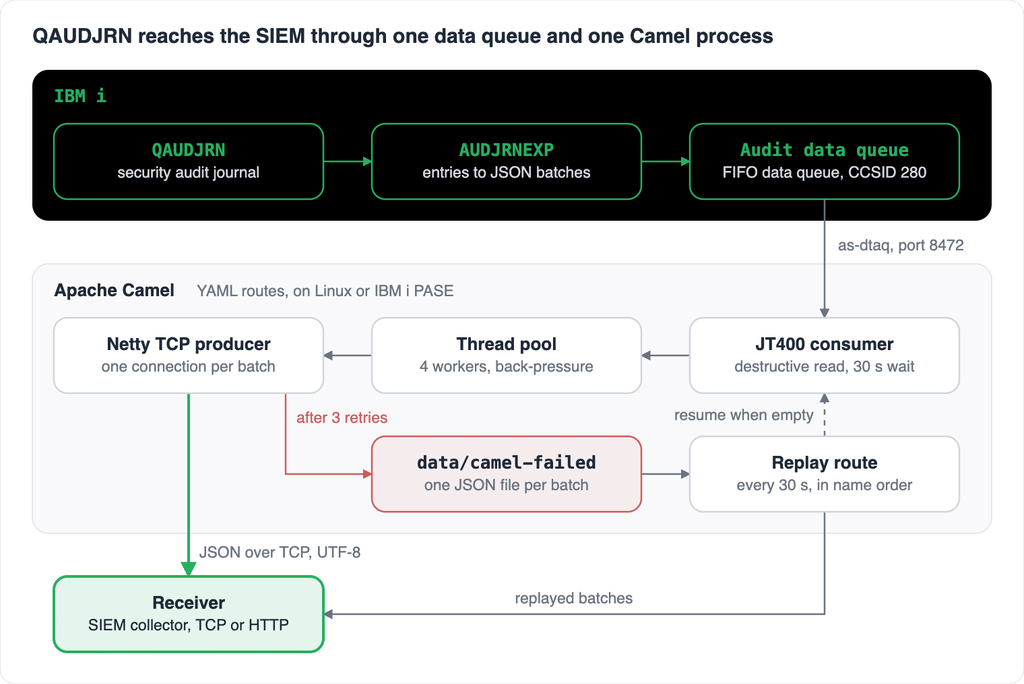
On the happy path a batch goes from QAUDJRN to the receiver in three hops. When the receiver does not answer, the batch is parked on disk and the replay route sends it later; in the default mode it also decides when reading from the data queue resumes.
How JT400 reads a data queue
JT400 is the IBM Toolbox for Java (JTOpen in its open-source form): a pure Java library that talks to the IBM i host servers over TCP. There is no native code and no ODBC driver involved, which is exactly why it runs the same way on a Linux box, in a container or on the IBM i itself.
When a Java program opens a data queue, three host servers come into play:
| Host server | Port (clear / TLS) | Role |
|---|---|---|
| Server mapper (as-svrmap) | 449 | Tells the client on which port each service listens |
| Sign-on (as-signon) | 8476 / 9476 | Validates the user profile and password |
| Data queue (as-dtaq) | 8472 / 9472 | Serves the actual read and write requests, prestart job QZHQSSRV |
If the data queue server is not active, STRHOSTSVR SERVER(*DTAQ) starts it. These are the same ports I talked about in Closing the insecure doors of your Host Servers with CFGHOSTSVR: if you have already moved your host servers to TLS, JT400 can follow you there.
To understand what Camel does under the hood, this is the same read written with the Toolbox API directly:
import com.ibm.as400.access.*;

AS400 system = new AS400("ibmi.example.internal", "AUDCAMEL", "secret");
DataQueue dq = new DataQueue(system, "/QSYS.LIB/MYLIB.LIB/AUDITQ.DTAQ");

while (true) {
    DataQueueEntry entry = dq.read(30);   // wait up to 30 seconds, -1 waits forever
    if (entry == null) continue;          // timeout: nothing arrived, read again
    byte[] data = entry.getData();        // raw EBCDIC bytes
    String json = (String) new AS400Text(data.length, 280, system).toObject(data);
    System.out.println(json);
}
Three details here explain most of the design choices you will see later:
- The read is destructive. On a FIFO data queue,
read()removes the entry. There is no commit and no rollback: once the entry is in Java memory, the data queue has forgotten it. If you only want to look, usepeek()in Java or the SQL services shown below. - An entry has no CCSID. A data queue stores bytes, not text. The reader must know how the writer encoded them; here AUDJRNEXP writes CCSID 280 (Italian EBCDIC), so the conversion to Unicode uses 280 explicitly.
- The wait is server side.
read(30)blocks in the QZHQSSRV job for up to 30 seconds, so an idle exporter does not burn CPU polling an empty queue.
When the Java process runs on the IBM i itself, you do not even need a password: new AS400("localhost", "*CURRENT", "*CURRENT") makes the Toolbox use the profile of the job it is running in. The Camel route takes advantage of this, as we will see.
While testing, two SQL services are worth keeping at hand. The first tells you how many batches are waiting; the second shows them without removing anything:
SELECT CURRENT_MESSAGES, MAXIMUM_MESSAGE_LENGTH
  FROM QSYS2.DATA_QUEUE_INFO
  WHERE DATA_QUEUE_LIBRARY = 'MYLIB'
    AND DATA_QUEUE_NAME = 'AUDITQ';

SELECT ORDINAL_POSITION, MESSAGE_ENQUEUE_TIMESTAMP, MESSAGE_DATA
  FROM TABLE(QSYS2.DATA_QUEUE_ENTRIES(
         DATA_QUEUE => 'AUDITQ',
         DATA_QUEUE_LIBRARY => 'MYLIB'))
  ORDER BY ORDINAL_POSITION;
CURRENT_MESSAGES is also the simplest health check of the whole pipeline: if it keeps growing, the consumer is not keeping up, or it has been suspended on purpose.
The Camel route, in YAML and nothing else
The whole consumer is three files: pom.xml, application.properties and audit.camel.yaml. There is no src/main/java: camel-main boots the context, camel-yaml-dsl loads the routes, and the Maven shade plugin builds a fat jar whose main class is org.apache.camel.main.Main. The project runs on Camel 4.18.0 and JDK 17.
The heart of it is the route that reads the data queue:
- route:
    id: qaudjrn-tcp
    routeConfigurationId: audit-dataq-errors
    from:
      uri: "jt400://{{ibmi.user:*CURRENT}}:{{ibmi.password:*CURRENT}}@{{ibmi.host:localhost}}/QSYS.LIB/{{ibmi.dataq.library}}.LIB/{{ibmi.dataq.name}}.DTAQ"
      parameters:
        format: text
        dataQueueCcsid: 280
        readTimeout: 30000
      steps:
        - threads:
            poolSize: "{{audit.camel.threads:4}}"
            maxPoolSize: "{{audit.camel.threads:4}}"
            maxQueueSize: "{{audit.camel.threads:4}}"
            callerRunsWhenRejected: true
        - convertBodyTo:
            type: java.lang.String
        - to: "{{audit.output.uri}}"
(I left out the spool branch for now; it comes back in the next section.)
The jt400: URI is the Java snippet above in one line. The IFS path of the object goes after the host, and the three parameters map one to one onto what we did by hand: format: text plus dataQueueCcsid: 280 replace the AS400Text conversion, and readTimeout: 30000 is the 30-second server-side wait, in milliseconds. The connection placeholders have a default after the colon, so if Camel runs on the IBM i and you omit ibmi.host, ibmi.user and ibmi.password, the URI becomes localhost with *CURRENT, and no password ends up in a properties file.
The threads step is where back-pressure lives. The JT400 consumer is a single reader; the step hands each batch to a pool of 4 workers with a queue of 4. When all workers are busy and the queue is full, callerRunsWhenRejected makes the reader thread send the batch itself, so it stops reading from the data queue until a worker frees up. Pressure then moves upstream: the batches stay in the data queue, and when the data queue fills up AUDJRNEXP waits. Nothing piles up in the JVM heap.
The destination is a single property:
audit.output.uri=netty:tcp://127.0.0.1:9000?sync=false&textline=true&autoAppendDelimiter=false&encoding=UTF-8&connectTimeout=5000&disconnect=true&synchronous=true| Parameter | Value | Why |
|---|---|---|
sync | false | No reply expected: the send ends when the bytes are written |
textline + autoAppendDelimiter | true + false | Text codec, but no \n appended: the JSON goes out exactly as read |
encoding | UTF-8 | Bytes on the wire are UTF-8, not EBCDIC |
connectTimeout | 5000 ms | After 5 seconds the connection attempt fails and the retries start |
disconnect | true | One connection per batch: with no delimiter, the close marks the end of the batch |
synchronous | true | The worker waits for the write; without it netty goes asynchronous and back-pressure and replay order are lost |
The last two are mandatory, not tuning. Without disconnect=true the receiver has no way to tell where one batch ends and the next begins. Without synchronous=true netty returns immediately, the four workers never look busy, and the careful back-pressure above silently disappears.
TLS is one parameter away: add &ssl=true to the URI and enable the global SSL context (camel.ssl.enabled, camel.component.netty.useGlobalSslContextParameters). For production, use camel.ssl.trustStore instead of trustAllCertificates, and keep in mind that netty does not verify the host name by default.
When the receiver goes down
Remember the destructive read: by the time the TCP send fails, the batch is no longer in the data queue. So the first rule of the error handling is that a failed batch is never just logged and dropped.
The data queue route uses a routeConfiguration with a single onException:
- onException:
    exception:
      - java.lang.Exception
    redeliveryPolicy:
      maximumRedeliveries: 3
      redeliveryDelay: 1000
      useExponentialBackOff: true
      backOffMultiplier: 2
    useOriginalMessage: true
    handled:
      constant: true
    steps:
      - setHeader:
          name: CamelFileName
          simple: "${date:now:yyyyMMdd-HHmmssSSS}-${exchangeId}.json"
      - to: "file:data/camel-failed?charset=UTF-8&tempPrefix=.inprogress-"
Three attempts with exponential back-off (1, 2 and 4 seconds), then the original batch is written to data/camel-failed/. The file name starts with a timestamp, so sorting by name gives the original order, and tempPrefix ensures the replay never picks up a half-written file. What happens next depends on audit.failure.mode:
suspend (default) | spool | |
|---|---|---|
| Data queue reading | Suspended | Continues |
| Where new events wait | In the data queue and in QAUDJRN, on the IBM i | In data/camel-failed/ only |
| Disk on the Camel side | Only the few batches already in flight | Grows with the outage |
| Recovery | Reading resumes when the folder is empty | Direct sending resumes at the first successful replay |
| Good for | Default: the IBM i keeps the data, nothing is lost by design | Short outages when the data queue must stay empty |
In suspend mode the handler asks the control bus for the route status and, if it is still Started, suspends it:
- to: "controlbus:route?routeId=qaudjrn-tcp&action=suspend&async=true&loggingLevel=OFF"The async=true is not optional. A route being suspended waits for its in-flight exchanges to complete, and this exchange is one of them: a synchronous suspend from inside its own error handler would wait for itself.
In spool mode the handler sets a global variable, auditSpool, to true. The main route checks it before sending: while it is set, each new batch goes straight to data/camel-failed/ without even trying the socket, so a dead receiver does not cost 7 seconds of retries per batch.
The replay route ties both modes together:
- route:
    id: camel-failed-replay
    routeConfigurationId: audit-replay-errors
    from:
      uri: "file:data/camel-failed"
      parameters:
        includeExt: json
        sortBy: "file:name"
        delay: "{{audit.replay.delay:30000}}"
        sendEmptyMessageWhenIdle: true
        delete: true
Every 30 seconds it sends the saved files in name order, each on its own connection, and deletes the ones delivered. Its own error handler uses handled: false with no redelivery, so a failed replay leaves the file where it is for the next round. The interesting part is sendEmptyMessageWhenIdle: when the folder is empty, the route receives an exchange with a null body, checks the status of the data queue route and resumes it if it is suspended. In suspend mode it works as a health probe for the receiver, without any extra code. In spool mode, the first file delivered successfully resets auditSpool to false, new batches go back to direct sending and the leftover files drain in the following rounds.
What TCP does not guarantee
Raw TCP is the simplest thing a SIEM collector can accept, and it is also the weakest contract you can have. It is worth being honest about it with the security team before go-live:
- A successful send means the bytes reached the operating system’s socket buffer. If the receiver crashes after accepting them but before processing them, the batch is lost and Camel never knows.
- There is no rejection. With HTTP a 4xx tells you the batch is malformed; with TCP every error looks like “receiver unreachable”, so there is no
data/camel-rejected/folder in this version. - A connection that drops halfway leaves a truncated JSON on the receiver side. The receiver must parse what it gets on each connection and discard anything that is not valid JSON.
- The pipeline is not transactional. Removing an entry from the data queue and writing it to a file are two separate operations, so a JVM crash in between can lose a batch, and a crash after a send but before a file is deleted can duplicate one.
For an audit trail, the last point has an important consequence: QAUDJRN is still the system of record. The exporter is a convenient copy for the SIEM, not a replacement for keeping journal receivers as long as your auditors require.
And over HTTP?
Raw TCP is what many collectors accept, but more and more log platforms expose an HTTP ingestion endpoint instead. With this design, switching is a configuration change, not a rewrite: the route only knows {{audit.output.uri}}, so moving from a TCP socket to an HTTP endpoint means swapping the netty dependency for camel-http and changing one property.
xml
<dependency>
  <groupId>org.apache.camel</groupId>
  <artifactId>camel-http</artifactId>
</dependency>
properties
# example endpoint
audit.output.uri=https://collector.example.internal:8443/ingest
The version comes from the Camel BOM already imported in the POM. Each batch becomes the body of a POST with Content-Type: application/json, and everything else stays: the JT400 reader, the thread pool, retries, data/camel-failed/, suspend and spool.
What changes is the contract, and it changes for the better:
| TCP | HTTP | |
|---|---|---|
| End of the batch | The connection is closed | The end of the request body |
| Delivery confirmation | None: bytes written to the socket | A 2xx status code from the receiver |
| Batch rejected by the receiver | Cannot happen | A 4xx moves the batch to data/camel-rejected/ |
Retry, suspend, spool, replay | As described above | Identical |
The confirmation removes the first weakness from the previous section: a 2xx means the receiver accepted the batch, not just that the operating system buffered it. The 4xx handling matters too. A malformed or unauthorized batch will fail the same way on every retry, so it goes to its own folder instead of blocking the replay of everything behind it; a 5xx or a connection error still follows the normal retry path.
What does not change is the destructive read on the data queue: a crash at the wrong moment can still lose or duplicate a batch. HTTP moves the weak point, it does not remove it.
Which one to pick is usually decided by the receiver. If it only listens on a socket, the TCP version is the shortest path; if it offers an HTTP endpoint, use it and get the acknowledgement for free.
Build it and try it without a SIEM
Copy the example configuration, set the IBM i connection and the receiver, and start it straight from Maven:
cp application.properties.example application.properties
mvn exec:java
For a real deployment, build the fat jar and start it from the folder that holds the two configuration files (they are deliberately not inside the jar, so you can change routes and settings without a rebuild):
mvn package
java -jar target/securityexporter-tcp-1.1.0.jar -pl file:application.properties
The jar runs anywhere there is a JDK 17, IBM i PASE included. On the IBM i, leave out ibmi.host, ibmi.user and ibmi.password: the connection goes to localhost with *CURRENT, and the user profile of the job only needs authority to the data queue.
To test without bothering the security team, I’ve built a small Node.js receiver (Node 18 or later). It accepts connections, collects everything that arrives until the close and prints it as one batch, formatted when it is valid JSON:
import { createServer } from 'node:net';
import { parseArgs } from 'node:util';

const { values: args } = parseArgs({
  options: {
    host: { type: 'string', default: '127.0.0.1' },
    port: { type: 'string', default: '9000' },
  },
});

const server = createServer((socket) => {
  const peer = `${socket.remoteAddress}:${socket.remotePort}`;
  const chunks = [];

  socket.on('data', (chunk) => chunks.push(chunk));
  socket.on('end', () => {
    const body = Buffer.concat(chunks).toString('utf8');
    console.log(`\n[${new Date().toISOString()}] ${peer} (${Buffer.byteLength(body)} byte)`);
    try {
      console.log(JSON.stringify(JSON.parse(body), null, 2));
    } catch {
      console.log(body);
    }
  });
  socket.on('error', (err) => console.log(`[${peer}] ${err.message}`));
});

server.listen(Number(args.port), args.host, () => {
  console.log(`Receiver TCP in ascolto su ${args.host}:${args.port}`);
});


node receiver_mock.mjs # listens on 127.0.0.1:9000
node receiver_mock.mjs --host 0.0.0.0 --port 9100
The best test is the failure one. Start Camel and the mock, generate some audit activity, then stop the mock with Ctrl+C. In suspend mode you will see three retries, a file in data/camel-failed/, the warning that reading is suspended, and CURRENT_MESSAGES on the data queue starting to grow. Restart the mock: within 30 seconds the file is replayed, the folder empties and reading resumes on its own.
Conclusion
The IBM i does not need a special integration product to talk to a SIEM, over TCP or over HTTP. A data queue is a perfectly good buffer between the system and the outside world, JT400 gives any JVM a clean way to read it, and Apache Camel turns the remaining plumbing, threads, retries, spooling, suspend and resume, into a few dozen lines of YAML.
The part worth copying is not the TCP endpoint, which you can swap in one line. It is the rule behind the error handling: data that has left the data queue must always be somewhere, either delivered, or on disk, or still on the IBM i because reading was stopped in time.
What about you? Have you ever thought about using Camel as a mechanism for integrating different data sources?